iOS Platform Development
iOS developer interviews test Swift language mastery, UIKit/SwiftUI framework knowledge, memory management understanding, and iOS-specific patterns rather than cross-platform development. Strong candidates write idiomatic Swift code, build native iOS interfaces effectively, manage memory properly, follow Apple design guidelines, and understand iOS architecture demonstrating platform expertise.
Swift Language Features
Optionals and Safety
Q: “Explain optionals and different ways to unwrap them.”
Optionals represent values that might be nil. Unwrapping methods:
- Forced unwrapping:
value!crashes if nil, avoid unless certain. - Optional binding:
if let unwrapped = value { }safe unwrapping. - Guard statement:
guard let unwrapped = value else { return }early exit pattern. - Nil coalescing:
value ?? defaultValueprovides fallback. - Optional chaining:
object?.property?.method()returns nil if any part is nil. - Implicitly unwrapped:
var value: String!use sparingly, outlets and dependency injection.
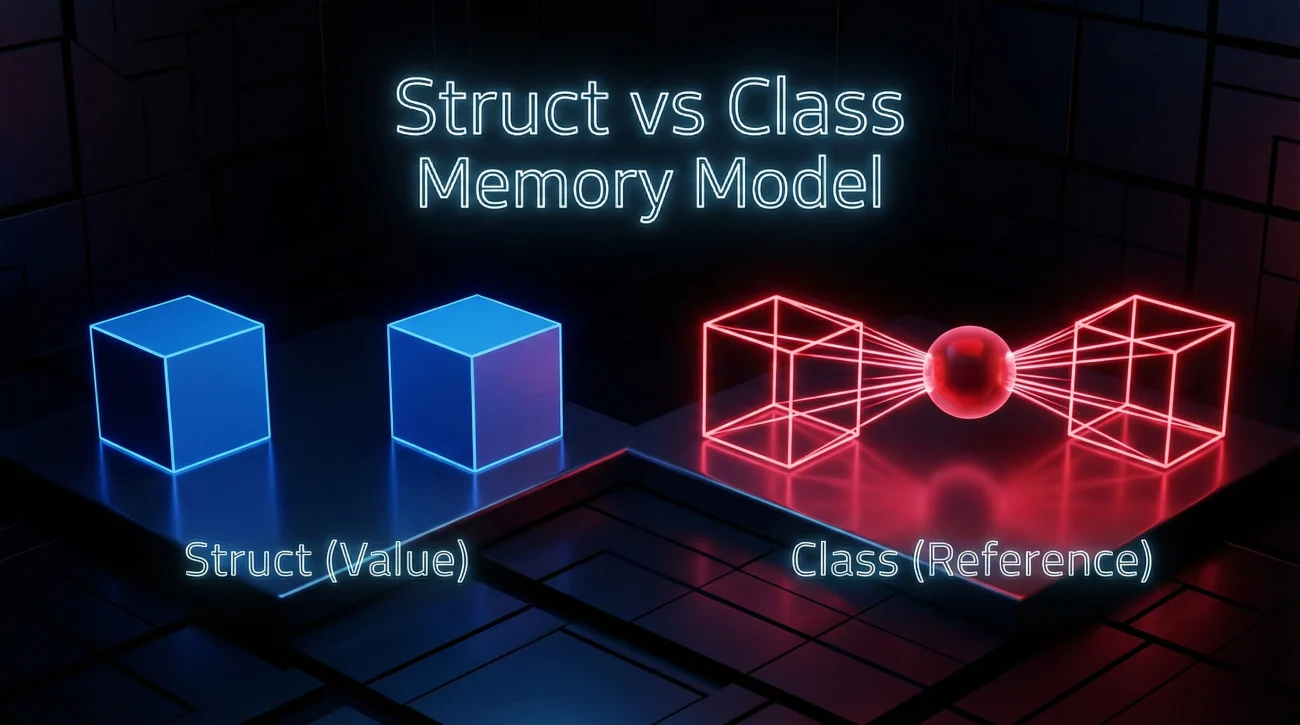
Q: “What’s the difference between struct and class in Swift?”
Key differences:
- Struct: Value type, copied on assignment, no inheritance, stack allocated, thread-safe by default.
- Class: Reference type, shared on assignment, supports inheritance, heap allocated, requires thread safety consideration.
- Use struct for: Simple data models, immutability preferred, small independent values.
- Use class for: Identity important, inheritance needed, shared mutable state, UIKit/AppKit integration.
- Mutating: Struct methods modifying properties need
mutatingkeyword.
Closures and Protocols
Q: “Explain closures and capture lists in Swift.”
Closures are self-contained blocks of functionality capturing values from surrounding context.
Syntax: { (parameters) -> ReturnType in statements }. Trailing closure syntax when last parameter.
Capture lists prevent retain cycles: [weak self] or [unowned self]. Use weak when self might become nil, unowned when guaranteed not nil.
Common use: Completion handlers, higher-order functions (map, filter, reduce), async callbacks.
Q: “What are protocols and protocol extensions?”
Protocols define blueprints of methods, properties, requirements that types must conform to. Similar to interfaces in other languages.
Protocol extensions provide default implementations. Enable protocol-oriented programming, composition over inheritance.
Associated types: associatedtype Item for generic protocols. Protocol inheritance: Protocols can inherit from other protocols.
Example: Codable protocol for JSON encoding/decoding, Equatable for comparison.
Q: “Explain generics in Swift with practical example.”
Generics write flexible reusable code working with any type. Function example: func swap<T>(_ a: inout T, _ b: inout T).
Generic types: struct Stack<Element> creating type-safe collections. Constraints: <T: Equatable> limiting to types conforming to protocol.
Benefits: Type safety, code reusability, performance (no runtime casting). Standard library uses extensively: Array, Dictionary, Optional.
Q: “What are property observers and computed properties?”
Property observers: willSet and didSet called before/after property changes. Use for side effects when value changes.
Computed properties: Don’t store value, calculate on access. Getter required: var area: Double { width * height }. Optional setter.
Lazy properties: lazy var computed only when first accessed, useful for expensive initialization.
Memory Management
Q: “Explain ARC and how to prevent retain cycles.”
Automatic Reference Counting:
- Automatic: ARC tracks references, deallocates when count reaches zero.
- Strong references: Default, increment reference count, keep object alive.
- Weak references: Don’t increment count, become nil when object deallocated, use for delegates.
- Unowned references: Don’t increment count, don’t become nil, crash if accessed after deallocation.
- Retain cycles: Two objects reference each other strongly, memory leak.
- Prevention: Use
weakorunownedin closures and delegates.
Q: “When would you use weak vs unowned references?”
Choosing between weak and unowned:
- Weak: When reference can become nil during lifetime, optional type, check before use.
- Unowned: When reference guaranteed to exist for object’s lifetime, non-optional, crashes if wrong.
- Delegate pattern: Usually weak (view controller dismissed, delegate becomes nil).
- Parent-child: Child holds unowned reference to parent (child can’t outlive parent).
- Safe default: Use weak unless certain unowned is safe.
UIKit and Interface Building

View Controllers and Lifecycle
Q: “Explain the view controller lifecycle methods.”
Lifecycle sequence:
viewDidLoad: Called once after view loaded into memory, setup that happens once.viewWillAppear: Called before view appears, setup happening every time.viewDidAppear: Called after view appears, start animations or data refresh.viewWillDisappear: Called before view disappears, pause operations.viewDidDisappear: Called after view disappears, stop expensive processes.deinit: Object being deallocated, cleanup observers and timers.
Q: “What’s the difference between frame and bounds?”
Frame vs bounds:
- Frame: Position and size relative to superview’s coordinate system, where view is in parent.
- Bounds: Position and size in own coordinate system, always origin (0,0), internal coordinate space.
- Use frame: Positioning subviews, moving view within parent.
- Use bounds: Drawing within view, scrolling (change bounds.origin).
- Transformation: Rotation/scaling affects frame but not bounds.
Auto Layout and Performance
Q: “How does Auto Layout work and when would you use it?”
Auto Layout uses constraints to define view positions and sizes dynamically. Each constraint is linear equation: view1.attribute = multiplier × view2.attribute + constant.
Constraint types: Leading/trailing (not left/right for RTL languages), top/bottom, width/height, center. Priority: Required (1000), high (750), low (250) for conflicting constraints.
Use Auto Layout for: Different screen sizes, rotation support, dynamic content, internationalization. Avoid for: Simple static layouts, performance-critical animations (use frames).
Programmatic constraints: NSLayoutConstraint or visual format language. Storyboard constraints: Interface Builder for visual design.
Q: “Explain intrinsic content size and content hugging/compression resistance.”
Intrinsic content size is natural size based on content. UILabel has intrinsic size from text, UIImageView from image dimensions. Not all views have intrinsic size (UIView doesn’t).
Content hugging: Resistance to growing larger than intrinsic size. Higher priority hugs content tighter. Default 250.
Compression resistance: Resistance to shrinking smaller than intrinsic size. Higher priority resists compression more. Default 750.
Example: Two labels side by side, one has higher hugging priority, other expands to fill space. One has higher compression resistance, stays visible when space tight.
Q: “How do you optimize table view performance?”
Cell reuse: dequeueReusableCell recycles cells, don’t create new cells each time. Register cell classes or nibs upfront.
Height caching: Cache calculated heights, use estimatedRowHeight for dynamic heights with Auto Layout. Avoid cellForRow in height calculation.
Opaque views: Set opaque = true when no transparency, enable layer optimizations. Avoid transparency and shadows when possible.
Image optimization: Load images async, cache appropriately sized images, use UIGraphicsImageRenderer for resizing. Background loading for network images.
Prefetching: Implement UITableViewDataSourcePrefetching loading data before scrolling to cell.
SwiftUI and Modern iOS
SwiftUI Fundamentals
Q: “How does SwiftUI differ from UIKit?”
Key differences:
- Declarative: Describe what UI should be, not how to build it. UIKit is imperative.
- State-driven: UI automatically updates when state changes, no manual refresh.
- Less code: More concise syntax, less boilerplate than UIKit.
- Preview: Live previews in Xcode, faster iteration than simulators.
- Cross-platform: Same code for iOS, macOS, watchOS, tvOS with adaptations.
- Limitations: Newer APIs iOS 13+, some UIKit features not available yet, interop needed for gaps.
Q: “Explain @State, @Binding, @ObservedObject, and @EnvironmentObject.”
SwiftUI property wrappers:
@State: Private mutable state owned by view, recreates view when changed.@Binding: Two-way connection to state owned elsewhere, parent passes binding to child.@ObservedObject: Reference type conforming to ObservableObject, for external data models.@StateObject: Like ObservedObject but view owns lifecycle, use for creating object.@EnvironmentObject: Dependency injection, shared data accessible by all child views.@Published: In ObservableObject, marks properties triggering view updates.
Combine and Networking
Q: “Explain Combine framework and when to use it.”
Combine basics:
- Publishers: Emit values over time, can complete or fail. Example: URLSession.dataTaskPublisher.
- Subscribers: Receive values from publishers. Sink and assign built-in subscribers.
- Operators: Transform, filter, combine streams. Map, filter, flatMap, merge, combineLatest.
- Cancellable: Store subscriptions, cancel when done to prevent memory leaks.
- Use cases: Async operations, event handling, data binding in MVVM, reactive programming.
- Alternative: Async/await for simpler cases, Combine for complex stream manipulation.
Q: “How do you handle networking in iOS apps?”
Networking approaches:
- URLSession: Native networking, data tasks for simple requests, download/upload tasks for files.
- Async/await:
let (data, response) = try await URLSession.shared.data(from: url)modern syntax. - Combine: URLSession.dataTaskPublisher for reactive streams.
- Codable: Parse JSON with
JSONDecoder().decode(Type.self, from: data). - Error handling: Check HTTP status codes, handle network errors, timeout configuration.
- Libraries: Alamofire for feature-rich networking, URLSession sufficient for most apps.
❓ FAQ
Should I learn UIKit or SwiftUI first?
Learn both, but start with UIKit for foundational understanding. UIKit: Mature, more resources, understanding iOS fundamentals, most existing codebases. SwiftUI: Modern, less code, future of iOS development, iOS 13+ only. Recommendation: Learn UIKit basics first (view controllers, Auto Layout, table views), then SwiftUI. Many companies still use UIKit extensively, SwiftUI adoption growing. SwiftUI wraps UIKit concepts, UIKit knowledge transfers. Job market: UIKit required more often currently, SwiftUI increasingly valued. Master one, understand other.
Do I need to learn Objective-C for iOS development?
Not for new projects, but helpful for maintenance. Swift is standard for new iOS development. Objective-C needed for: legacy codebases, maintaining older apps, reading old documentation, understanding frameworks. Basic Objective-C: Read and understand syntax, interop with Swift, not write new code. Focus on Swift: Modern, safer, better tooling, community momentum. Learning curve: Swift easier for beginners than Objective-C. Job requirements: Some jobs require Objective-C, most prioritize Swift. Strategy: Master Swift, learn Objective-C basics if job requires.
How important is understanding memory management in Swift?
Critical despite ARC automation. Memory leaks still possible: retain cycles in closures, delegates, two-way references. Interview focus: Understanding weak/unowned/strong, preventing retain cycles, when each reference type appropriate. Debugging: Instruments for leak detection, memory graph debugger, understanding retain cycles. Production impact: Memory leaks crash apps, poor performance, user complaints. Must know: ARC basics, closure capture lists, delegate patterns, common leak scenarios. Not memorization: Understanding principles, recognizing patterns, debugging skills. Even with ARC, memory management understanding differentiates strong iOS developers.
What’s the best way to learn iOS development?
Hands-on project-based learning most effective. Start with: Apple’s Swift documentation, Stanford CS193p course (free on YouTube), Ray Wenderlich tutorials. Build projects: Clone existing apps (Twitter, Instagram), add features progressively, deploy to TestFlight. Practice: Daily coding, small apps first, gradually increase complexity, understand why not just how. Community: Stack Overflow for problems, iOS dev communities, Twitter iOS developers, attend meetups. Official resources: WWDC videos, Apple documentation, sample code. Avoid: Tutorial hell (watching without building), jumping to complex projects too soon. Timeline: 6-12 months to job-ready with consistent practice.
How do I prepare for iOS developer interviews?
Multi-faceted preparation required. Swift fundamentals: Optionals, protocols, memory management, closures, generics. iOS concepts: View controller lifecycle, Auto Layout, table views, navigation patterns. Architecture: MVVM implementation, dependency injection, testing strategies. Coding challenges: LeetCode in Swift, algorithm problems, live coding practice. System design: Design iOS apps, discuss trade-offs, explain architectural decisions. Portfolio: 2-3 polished apps in App Store, clean code on GitHub, demonstrate best practices. Mock interviews: Practice explaining code, whiteboard coding, technical discussions. Common questions: Memory management, architecture patterns, Swift vs Objective-C, recent iOS features. Stay current: Latest iOS version, new frameworks, WWDC announcements.
Final Thoughts
iOS developer interviews test Swift language mastery, UIKit/SwiftUI framework knowledge, memory management understanding, and iOS-specific patterns. Strong candidates write idiomatic Swift code, build native iOS interfaces effectively, manage memory properly, follow Apple design guidelines, and understand iOS architecture. Focus on Swift fundamentals, memory management, and platform-specific knowledge distinguishing iOS development from cross-platform approaches.
Want more than this one guide? Browse the complete interview questions collection to keep your practice organized across roles and themes.
⚠️ Disclaimer: The interview strategies, sample answers, and negotiation tips provided in this guide are for educational purposes only. Hiring decisions are subjective and vary by company and industry. While these strategies are based on professional HR standards, they do not guarantee a specific job offer or result.